

当执行一个搜索时,它将这个搜索请求广播给所有的索引分片。可以通过提供路由参数来控制要搜索哪些分片。例如,当检索tweets这个索引时,路由参数可以设置为用户名:

curl -X POST "localhost:9200/twitter/_search?routing=kimchy" -H 'Content-Type: application/json' -d'{    "query": {        "bool" : {            "must" : {                "query_string" : {                    "query" : "some query string here"
                }
            },            "filter" : {                "term" : { "user" : "kimchy" }
            }
        }
    }
}'
1. Search
查询可以提供一个简单的查询字符串作为参数,也可以用一个请求体。
1.1. URI Search
这种方式用的很少,就不细说了,举个例子吧:
curl -X GET "localhost:9200/product/_search?q=category:honor&sort=price:asc"
1.2. Request Body Search
同样,举个例子:
curl -X GET "localhost:9200/twitter/_search" -H 'Content-Type: application/json' -d'{    "query" : {        "term" : { "user" : "kimchy" }
    }
}'
1.2.1. Query
可以用 Query DSL 定义一个query
curl -X GET "localhost:9200/_search" -H 'Content-Type: application/json' -d'{    "query" : {        "term" : { "user" : "kimchy" }
    }
}'
1.2.2. From / Size
通过 from 和 size 参数,可以分页查询。from 表示从第几条开始取,size 表示最多取多少条。from默认值是0,size默认值是10
curl -X GET "localhost:9200/product/_search" -H 'Content-Type: application/json' -d'{    "from" : 0,
    "size" : 10,    "query" : {        "term" : { "user" : "kimchy" }
    }
}'
1.2.3. Sort
可以按一个或多个字段排序
有一些特殊的排序字段:_score 表示按分数排序,_doc 表示按索引顺序排序
假设有这样一个索引:
curl -X PUT "localhost:9200/my_index" -H 'Content-Type: application/json' -d'{    "mappings": {        "_doc": {            "properties": {                "post_date": { "type": "date" },                "user": {                    "type": "keyword"
                },                "name": {                    "type": "keyword"
                },                "age": { "type": "integer" }
            }
        }
    }
}'
针对这个索引,我们这样来查询:
curl -X GET "localhost:9200/my_index/_search" -H 'Content-Type: application/json' -d'{    "sort" : [
        { "post_date" : {"order" : "asc"}},        "user",
        { "name" : "desc" },
        { "age" : "desc" },        "_score"
    ],    "query" : {        "term" : { "user" : "kimchy" }
    }
}'
这个例子,依次按照 post_date升序、user升序、name降序、age降序、分数升序排序
(PS:_doc是最有效的排序,如果不关心文档的返回顺序的话)
Elasticsearch支持按数组或者多值字段排序,mode选项用来控制基于数组中的那个值来对文档进行排序。mode选项的可选值有:
min :最小值
max :最大值
sum :用所有值的和来作为排序值
avg :用所有值的平均值作为排序值
median :用所有值的中间值作为排序值
举个例子:
curl -X PUT "localhost:9200/my_index/_doc/1?refresh" -H 'Content-Type: application/json' -d'{   "product": "chocolate",   "price": [20, 4]
}'curl -X POST "localhost:9200/_search" -H 'Content-Type: application/json' -d'{   "query" : {      "term" : { "product" : "chocolate" }
   },   "sort" : [
      {"price" : {"order" : "asc", "mode" : "avg"}}
   ]
}'
什么意思呢?也就说,字段的值可能是一个数组,或者该字段值有多个,那么当我们按这种字段排序的时候就必须确定在排序的时候这个字段的值是什么,也就是该字段的排序值
所谓的mode选项就是用来确定这种字段的最终排序值的,比如:取字段值数组中最小的那个值作为该字段的排序值,或者取最大、或者平均值等等
上面的例子中,price字段值是一个数组,数组有两个元素,后面的查询指定的mode是avg,意味着price字段在排序的时候它的排序值是 (20+4)/2=12
上例中,对结果集按price字段升序排序,price字段的排序值是price字段值求平均
Mission
mission 参数用于指定当文档没有这个字段时该如何处理,可选值是:_last 和 _first ,默认是 _last
类似于关系型数据库中字段为NULL的记录都放在最后
curl -X GET "localhost:9200/_search" -H 'Content-Type: application/json' -d'{    "sort" : [
        { "price" : {"missing" : "_last"} }
    ],    "query" : {        "term" : { "product" : "chocolate" }
    }
}'
1.2.4. Source filtering
可以控制 _source 字段怎样返回
默认返回 _source字段的内容,当然你可以设置不返回该字段,例如:
curl -X GET "localhost:9200/_search" -H 'Content-Type: application/json' -d'{    "_source": false,    "query" : {        "term" : { "user" : "kimchy" }
    }
}'
正常情况下,返回是这样的:
{        "_index" : "product",        "_type" : "_doc",        "_id" : "3",        "_score" : 1.0,        "_source" : {          "productName" : "Honor Note10",          "category" : "Honor",          "price" : 2499
        }
}
禁用后是这样的:
{ "_index" : "product", "_type" : "_doc", "_id" : "3", "_score" : 1.0}还可以用通配符,以进一步控制_source中返回那些字段:
curl -X GET "localhost:9200/product/_search?pretty" -H 'Content-Type: application/json' -d'{    "_source": "product*",    "query" : {        "match_all" : {}
    }
}'
或者
curl -X GET "localhost:9200/product/_search?pretty" -H 'Content-Type: application/json' -d'{    "_source": ["product*", "abc*"],    "query" : {        "match_all" : {}
    }
}'
1.2.5. 高亮
curl -X GET "localhost:9200/product/_search?pretty" -H 'Content-Type: application/json' -d'{    "query" : {        "match" : { "category" : "MI" }
    },    "highlight" : {        "fields" : {            "productName": {}
        }
    }
}'
https://www.elastic.co/guide/en/elasticsearch/reference/current/search-request-highlighting.html
1.2.6. Explain
执行计划可以看到分数是怎样计算出来的
curl -X GET "localhost:9200/_search" -H 'Content-Type: application/json' -d'{    "explain": true,    "query" : {        "term" : { "user" : "kimchy" }
    }
}'
1.3. Count
curl -X GET "localhost:9200/product/_doc/_count?pretty&q=category:honor"curl -X GET "localhost:9200/product/_doc/_count?pretty" -H 'Content-Type: application/json' -d'{    "query" : {        "term" : { "category" : "honor" }
    }
}'{  "count" : 3,  "_shards" : {    "total" : 5,    "successful" : 5,    "skipped" : 0,    "failed" : 0
  }
}
2. Aggregations
相当于关系型数据库中的聚集函数(或者叫聚合函数)
聚合可以嵌套!聚合可以嵌套!!聚合可以嵌套!!!
聚合主要有4种类型:
Bucketing
Mertric
Matrix
Pipeline
基本的聚合结构是这样的:
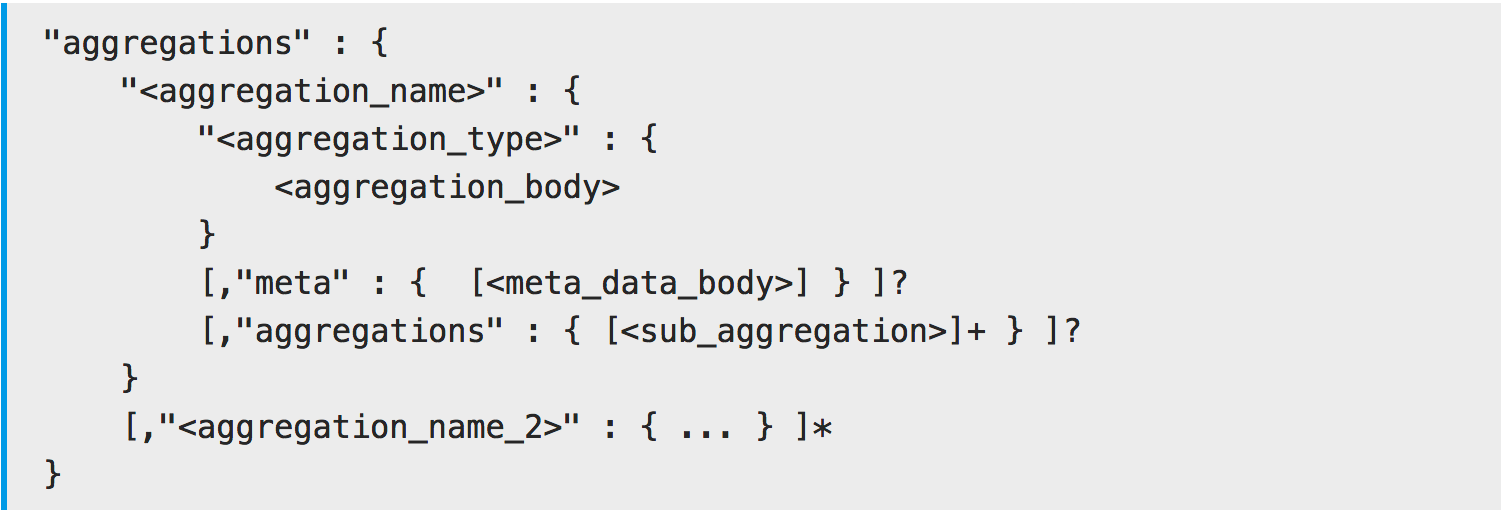
aggregations 是一个JSON对象,它代表一个聚合。(PS:这个关键字也可以用 aggs )
每个聚合都关联了一个逻辑名称(例如:如果聚合计算平均价格,那么在这个场景下我可以给这个聚合起个名字叫“avg_price”)
在响应结果中,这些逻辑名称用于唯一标识一个聚合
每个聚合都有一个指定的类型(比如:sum ,avg ,max ,min 等等)
每个聚合类型都定义了自己的body
2.1. Metrics Aggregations
这种类型的聚合是基于以某种方式从聚合的文档中提取的值来计算度量。这个值通常取自文档的字段值,也可以通过脚本计算得到的。
数值度量聚合是一种特殊的度量聚合,它输出数值。根据输出值的多少,分为单值数值度量聚合(比如:avg)和多值数值度量聚合(比如:stats)。
2.1.1. Avg
从文档的数值字段中提取值进行计算
假设,我们的文档是学生成绩(0~100),我们可以求平均分数:
curl -X POST "localhost:9200/exams/_search?size=0" -H 'Content-Type: application/json' -d'{    "aggs":{        "avg_grade":{            "avg":{                "field":"grade"
            }
        }
    }
}'
上面的聚合例子,计算所有学生的平均成绩。这里的聚合类型是avg,field指定哪个字段用于计算。
再来一个例子:
请求:
curl -X POST "localhost:9200/product/_search?size=0" -H 'Content-Type: application/json' -d'{    "aggs":{        "avg_price":{            "avg":{                "field":"price"
            }
        }
    }
}'响应:
{    "took":13,    "timed_out":false,    "_shards":{        "total":5,        "successful":5,        "skipped":0,        "failed":0
    },    "hits":{        "total":7,        "max_score":0,        "hits":[

        ]
    },    "aggregations":{        "avg_price":{            "value":2341.5714285714284
        }
    }
}
默认情况下,没有那个字段的文档将被忽略(PS:就像关系型数据库中求平均值时会忽略NULL的记录一样),我们可以给它指定一个值,例如:
curl -X POST "localhost:9200/exams/_search?size=0" -H 'Content-Type: application/json' -d'{    "aggs" : {        "grade_avg" : {            "avg" : {                "field" : "grade",                "missing": 10
            }
        }
    }
}'
如果文档没有grade字段,那么用10作为该字段值参与计算
2.1.2. Sum
从文档的数值字段中提取值进行计算
请求:
curl -X POST "localhost:9200/product/_search?size=0" -H 'Content-Type: application/json' -d'{    "query":{        "constant_score":{            "filter":{                "match":{                    "category":"vivo"
                }
            }
        }
    },    "aggs":{        "vivo_prices":{            "sum":{                "field":"price"
            }
        }
    }
}'响应:
{    "took":3,    "timed_out":false,    "_shards":{        "total":5,        "successful":5,        "skipped":0,        "failed":0
    },    "hits":{        "total":2,        "max_score":0,        "hits":[

        ]
    },    "aggregations":{        "vivo_prices":{            "value":3796
        }
    }
}
求category字段值匹配vivo的商品的价格总和
相当于,select sum(price) from product where category like '%vivo%' group by category
2.1.3. Max
从文档的数值字段中提取值进行计算
curl -X POST "localhost:9200/sales/_search?size=0" -H 'Content-Type: application/json' -d'{    "aggs" : {        "max_price" : {
            "max" : {
                "field" : "price"
            }
        }
    }
}'
2.1.4. Stats
这是一个多值聚合,它返回 min ,max ,sum ,count ,avg 的组合结果
curl -X POST "localhost:9200/exams/_search?size=0" -H 'Content-Type: application/json' -d'{    "aggs" : {        "grades_stats" : {
            "stats" : {
                "field" : "grade"
            }
        }
    }
}'
它的返回可能是这样的:
{
    ...    "aggregations": {        "grades_stats": {            "count": 2,            "min": 50.0,            "max": 100.0,            "avg": 75.0,            "sum": 150.0
        }
    }
}
再来一个例子:
请求:
curl -X POST "localhost:9200/product/_search?size=0" -H 'Content-Type: application/json' -d'{    "aggs" : {        "product_stats" : {
            "stats" : {
                "field" : "price"
            }
        }
    }
}'响应:
{    "took":4,    "timed_out":false,    "_shards":{        "total":5,        "successful":5,        "skipped":0,        "failed":0
    },    "hits":{        "total":7,        "max_score":0,        "hits":[

        ]
    },    "aggregations":{        "product_stats":{            "count":7,            "min":998,            "max":4299,            "avg":2341.5714285714284,            "sum":16391
        }
    }
}
2.2. Bucket Aggregations
可以理解为范围聚合,它的结果是一段一段的,一个一个的bucket
2.2.1. Range
每个Range包含from,不包含to
前闭后开区间
curl -X GET "localhost:9200/_search" -H 'Content-Type: application/json' -d'{    "aggs" : {        "price_ranges" : {            "range" : {                "field" : "price",                "ranges" : [
                    { "to" : 100.0 },
                    { "from" : 100.0, "to" : 200.0 },
                    { "from" : 200.0 }
                ]
            }
        }
    }
}'
返回可能是这样的:
{
    ...    "aggregations": {        "price_ranges" : {            "buckets": [
                {                    "key": "*-100.0",                    "to": 100.0,                    "doc_count": 2
                },
                {                    "key": "100.0-200.0",                    "from": 100.0,                    "to": 200.0,                    "doc_count": 2
                },
                {                    "key": "200.0-*",                    "from": 200.0,                    "doc_count": 3
                }
            ]
        }
    }
}
再比如:
请求:
curl -X GET "localhost:9200/product/_search" -H 'Content-Type: application/json' -d'{    "aggs" : {        "price_ranges" : {            "range" : {                "field" : "price",                "ranges" : [
                    { "to" : 1000 },
                    { "from" : 1000, "to" : 2000 },
                    { "from" : 2000 }
                ]
            }
        }
    }
}'响应:
{    "took":1,    "timed_out":false,    "_shards":{        "total":5,        "successful":5,        "skipped":0,        "failed":0
    },    "hits":{        "total":7,        "max_score":1,        "hits":[
            {                "_index":"product",                "_type":"_doc",                "_id":"5",                "_score":1,                "_source":{                    "productName":"MI 8",                    "category":"MI",                    "price":2499
                }
            },
            {                "_index":"product",                "_type":"_doc",                "_id":"2",                "_score":1,                "_source":{                    "productName":"Honor Magic2",                    "category":"Honor",                    "price":4299
                }
            },
            {                "_index":"product",                "_type":"_doc",                "_id":"4",                "_score":1,                "_source":{                    "productName":"MI Max2",                    "category":"MI",                    "price":1099
                }
            },
            {                "_index":"product",                "_type":"_doc",                "_id":"6",                "_score":1,                "_source":{                    "productName":"vivo X23",                    "category":"vivo",                    "price":2798
                }
            },
            {                "_index":"product",                "_type":"_doc",                "_id":"1",                "_score":1,                "_source":{                    "productName":"Honor 10",                    "category":"Honor",                    "price":2199
                }
            },
            {                "_index":"product",                "_type":"_doc",                "_id":"7",                "_score":1,                "_source":{                    "productName":"vivo Z1",                    "category":"vivo",                    "price":998
                }
            },
            {                "_index":"product",                "_type":"_doc",                "_id":"3",                "_score":1,                "_source":{                    "productName":"Honor Note10",                    "category":"Honor",                    "price":2499
                }
            }
        ]
    },    "aggregations":{        "price_ranges":{            "buckets":[
                {                    "key":"*-1000.0",                    "to":1000,                    "doc_count":1
                },
                {                    "key":"1000.0-2000.0",                    "from":1000,                    "to":2000,                    "doc_count":1
                },
                {                    "key":"2000.0-*",                    "from":2000,                    "doc_count":5
                }
            ]
        }
    }
}
代替返回一个数组,可以设置keyed为true,这样可以给每个bucket关联一个位于的字符串key,例如:
curl -X GET "localhost:9200/_search" -H 'Content-Type: application/json' -d'{    "aggs" : {        "price_ranges" : {            "range" : {                "field" : "price",                "keyed" : true,                "ranges" : [
                    { "to" : 100 },
                    { "from" : 100, "to" : 200 },
                    { "from" : 200 }
                ]
            }
        }
    }
}'
于是返回变成这样了:
{
    ...    "aggregations": {        "price_ranges" : {            "buckets": {                "*-100.0": {                    "to": 100.0,                    "doc_count": 2
                },                "100.0-200.0": {                    "from": 100.0,                    "to": 200.0,                    "doc_count": 2
                },                "200.0-*": {                    "from": 200.0,                    "doc_count": 3
                }
            }
        }
    }
}
当然,我们也可以给每个范围区间自定义key:
curl -X GET "localhost:9200/_search" -H 'Content-Type: application/json' -d'{    "aggs" : {        "price_ranges" : {            "range" : {                "field" : "price",                "keyed" : true,                "ranges" : [
                    { "key" : "cheap", "to" : 100 },
                    { "key" : "average", "from" : 100, "to" : 200 },
                    { "key" : "expensive", "from" : 200 }
                ]
            }
        }
    }
}'
返回:
{
    ...    "aggregations": {        "price_ranges" : {            "buckets": {                "cheap": {                    "to": 100.0,                    "doc_count": 2
                },                "average": {                    "from": 100.0,                    "to": 200.0,                    "doc_count": 2
                },                "expensive": {                    "from": 200.0,                    "doc_count": 3
                }
            }
        }
    }
}
举个栗子:
请求:
curl -X GET "localhost:9200/product/_search" -H 'Content-Type: application/json' -d'{    "query": {        "match" : { "category" : "honor"}
    },    "aggs" : {        "price_ranges" : {            "range" : {                "field" : "price",                "keyed" : true,                "ranges" : [
                    { "key" : "low", "to" : 1000 },
                    { "key" : "medium", "from" : 1000, "to" : 2000 },
                    { "key" : "high", "from" : 2000 }
                ]
            }
        }
    }
}'响应:
{    "took":1,    "timed_out":false,    "_shards":{        "total":5,        "successful":5,        "skipped":0,        "failed":0
    },    "hits":{        "total":3,        "max_score":0.9808292,        "hits":[
            {                "_index":"product",                "_type":"_doc",                "_id":"2",                "_score":0.9808292,                "_source":{                    "productName":"Honor Magic2",                    "category":"Honor",                    "price":4299
                }
            },
            {                "_index":"product",                "_type":"_doc",                "_id":"1",                "_score":0.6931472,                "_source":{                    "productName":"Honor 10",                    "category":"Honor",                    "price":2199
                }
            },
            {                "_index":"product",                "_type":"_doc",                "_id":"3",                "_score":0.2876821,                "_source":{                    "productName":"Honor Note10",                    "category":"Honor",                    "price":2499
                }
            }
        ]
    },    "aggregations":{        "price_ranges":{            "buckets":{                "low":{                    "to":1000,                    "doc_count":0
                },                "medium":{                    "from":1000,                    "to":2000,                    "doc_count":0
                },                "high":{                    "from":2000,                    "doc_count":3
                }
            }
        }
    }
}
2.2.2. Filter
先过滤再聚合
请求:
curl -X POST "localhost:9200/product/_search?size=0" -H 'Content-Type: application/json' -d'{    "aggs":{        "vivo":{            "filter":{                "term":{                    "category":"vivo"
                }
            },            "aggs":{                "avg_price":{                    "avg":{                        "field":"price"
                    }
                }
            }
        }
    }
}'响应:
{    "took":2,    "timed_out":false,    "_shards":{        "total":5,        "successful":5,        "skipped":0,        "failed":0
    },    "hits":{        "total":7,        "max_score":0,        "hits":[

        ]
    },    "aggregations":{        "vivo":{            "doc_count":2,            "avg_price":{                "value":1898
            }
        }
    }
}
2.2.3. Terms Aggregation
相当于关系型数据库中的分组(group by)
curl -X GET "localhost:9200/_search" -H 'Content-Type: application/json' -d'{    "aggs" : {        "genres" : {            "terms" : { "field" : "genre" }
        }
    }
}'
返回可能是这样的:
{
    ...    "aggregations" : {        "genres" : {            "doc_count_error_upper_bound": 0,
            "sum_other_doc_count": 0,
            "buckets" : [
                {                    "key" : "electronic",                    "doc_count" : 6
                },
                {                    "key" : "rock",                    "doc_count" : 3
                },
                {                    "key" : "jazz",                    "doc_count" : 2
                }
            ]
        }
    }
}
再举个例子:
请求:
curl -X GET "localhost:9200/product/_search" -H 'Content-Type: application/json' -d'{    "aggs" : {        "group_by_category" : {            "terms" : { "field" : "category" }
        }
    }
}'响应:
{    "took":16,    "timed_out":false,    "_shards":{        "total":5,        "successful":5,        "skipped":0,        "failed":0
    },    "hits":{        "total":7,        "max_score":1,        "hits":[
            {                "_index":"product",                "_type":"_doc",                "_id":"5",                "_score":1,                "_source":{                    "productName":"MI 8",                    "category":"MI",                    "price":2499
                }
            },
            {                "_index":"product",                "_type":"_doc",                "_id":"2",                "_score":1,                "_source":{                    "productName":"Honor Magic2",                    "category":"Honor",                    "price":4299
                }
            },
            {                "_index":"product",                "_type":"_doc",                "_id":"4",                "_score":1,                "_source":{                    "productName":"MI Max2",                    "category":"MI",                    "price":1099
                }
            },
            {                "_index":"product",                "_type":"_doc",                "_id":"6",                "_score":1,                "_source":{                    "productName":"vivo X23",                    "category":"vivo",                    "price":2798
                }
            },
            {                "_index":"product",                "_type":"_doc",                "_id":"1",                "_score":1,                "_source":{                    "productName":"Honor 10",                    "category":"Honor",                    "price":2199
                }
            },
            {                "_index":"product",                "_type":"_doc",                "_id":"7",                "_score":1,                "_source":{                    "productName":"vivo Z1",                    "category":"vivo",                    "price":998
                }
            },
            {                "_index":"product",                "_type":"_doc",                "_id":"3",                "_score":1,                "_source":{                    "productName":"Honor Note10",                    "category":"Honor",                    "price":2499
                }
            }
        ]
    },    "aggregations":{        "group_by_category":{            "doc_count_error_upper_bound":0,            "sum_other_doc_count":0,            "buckets":[
                {                    "key":"honor",                    "doc_count":3
                },
                {                    "key":"mi",                    "doc_count":2
                },
                {                    "key":"vivo",                    "doc_count":2
                }
            ]
        }
    }
}
size 可以用于指定返回多少个term bucket
请求:
curl -X GET "localhost:9200/product/_search" -H 'Content-Type: application/json' -d'{    "aggs" : {        "group_by_category" : {            "terms" : {
                "field" : "category",                "size" : 2
            }
        }
    }
}'响应:
{
    ...
    "aggregations":{        "group_by_category":{            "doc_count_error_upper_bound":0,            "sum_other_doc_count":2,            "buckets":[
                {                    "key":"honor",                    "doc_count":3
                },
                {                    "key":"mi",                    "doc_count":2
                }
            ]
        }
    }
}
3. 示例
排序
curl -X POST "localhost:9200/product/_search" -H 'Content-Type: application/json' -d'{    "query" : {        "term" : { "category" : "honor"}
    },    "sort" : "price"}'curl -X POST "localhost:9200/product/_search" -H 'Content-Type: application/json' -d'{    "query" : {        "term" : { "category" : "honor"}
    },    "sort" : { "price" : "desc" }
}'curl -X POST "localhost:9200/product/_search" -H 'Content-Type: application/json' -d'{    "query" : {        "term" : { "category" : "honor"}
    },    "sort" : { "price" : { "order" : "desc" } }
}'响应:
{    "took":1,    "timed_out":false,    "_shards":{        "total":5,        "successful":5,        "skipped":0,        "failed":0
    },    "hits":{        "total":3,        "max_score":null,        "hits":[
            {                "_index":"product",                "_type":"_doc",                "_id":"2",                "_score":null,                "_source":{                    "productName":"Honor Magic2",                    "category":"Honor",                    "price":4299
                },                "sort":[                    4299
                ]
            },
            {                "_index":"product",                "_type":"_doc",                "_id":"3",                "_score":null,                "_source":{                    "productName":"Honor Note10",                    "category":"Honor",                    "price":2499
                },                "sort":[                    2499
                ]
            },
            {                "_index":"product",                "_type":"_doc",                "_id":"1",                "_score":null,                "_source":{                    "productName":"Honor 10",                    "category":"Honor",                    "price":2199
                },                "sort":[                    2199
                ]
            }
        ]
    }
}
分组求平均
请求:
curl -X GET "localhost:9200/product/_search" -H 'Content-Type: application/json' -d'{    "aggs" : {        "group_by_category" : {            "terms" : {
                "field" : "category"
            },            "aggs" : {                "avg_price" : {                    "avg" : {                        "field" : "price"
                    }
                }
            }
        }
    }
}'响应:
{    "took":2,    "timed_out":false,    "_shards":{        "total":5,        "successful":5,        "skipped":0,        "failed":0
    },    "hits":{        "total":7,        "max_score":1,        "hits":[
            {                "_index":"product",                "_type":"_doc",                "_id":"5",                "_score":1,                "_source":{                    "productName":"MI 8",                    "category":"MI",                    "price":2499
                }
            },
            {                "_index":"product",                "_type":"_doc",                "_id":"2",                "_score":1,                "_source":{                    "productName":"Honor Magic2",                    "category":"Honor",                    "price":4299
                }
            },
            {                "_index":"product",                "_type":"_doc",                "_id":"4",                "_score":1,                "_source":{                    "productName":"MI Max2",                    "category":"MI",                    "price":1099
                }
            },
            {                "_index":"product",                "_type":"_doc",                "_id":"6",                "_score":1,                "_source":{                    "productName":"vivo X23",                    "category":"vivo",                    "price":2798
                }
            },
            {                "_index":"product",                "_type":"_doc",                "_id":"1",                "_score":1,                "_source":{                    "productName":"Honor 10",                    "category":"Honor",                    "price":2199
                }
            },
            {                "_index":"product",                "_type":"_doc",                "_id":"7",                "_score":1,                "_source":{                    "productName":"vivo Z1",                    "category":"vivo",                    "price":998
                }
            },
            {                "_index":"product",                "_type":"_doc",                "_id":"3",                "_score":1,                "_source":{                    "productName":"Honor Note10",                    "category":"Honor",                    "price":2499
                }
            }
        ]
    },    "aggregations":{        "group_by_category":{            "doc_count_error_upper_bound":0,            "sum_other_doc_count":0,            "buckets":[
                {                    "key":"honor",                    "doc_count":3,                    "avg_price":{                        "value":2999
                    }
                },
                {                    "key":"mi",                    "doc_count":2,                    "avg_price":{                        "value":1799
                    }
                },
                {                    "key":"vivo",                    "doc_count":2,                    "avg_price":{                        "value":1898
                    }
                }
            ]
        }
    }
}
4. 示例索引
curl -X PUT "localhost:9200/product" -H 'Content-Type: application/json' -d'{    "mappings" : {        "_doc" : {            "properties": {                "productName": {"type": "text"},                "category": {"type": "text", "fielddata": true},                "price": {"type": "integer"}
            }
        }
    }
}'curl -X POST "localhost:9200/product/_doc/_bulk" -H 'Content-Type: application/json' --data-binary "@product.json"{"index" : {"_id" : "1" } }
{"productName" : "Honor 10", "category" : "Honor", "price" : 2199}
{"index" : {"_id" : "2" } }
{"productName" : "Honor Magic2", "category" : "Honor", "price" : 4299}
{"index" : {"_id" : "3" } }
{"productName" : "Honor Note10", "category" : "Honor", "price" : 2499}
{"index" : {"_id" : "4" } }
{"productName" : "MI Max2", "category" : "MI", "price" : 1099}
{"index" : {"_id" : "5" } }
{"productName" : "MI 8", "category" : "MI", "price" : 2499}
{"index" : {"_id" : "6" } }
{"productName" : "vivo X23", "category" : "vivo", "price" : 2798}
{"index" : {"_id" : "7" } }
{"productName" : "vivo Z1", "category" : "vivo", "price" : 998}
5. 参考
https://www.elastic.co/guide/en/elasticsearch/reference/current/search-aggregations-metrics.html
https://www.elastic.co/guide/en/elasticsearch/reference/current/search-aggregations-bucket.html
6. 其它相关
共同学习,写下你的评论
评论加载中...
作者其他优质文章